


Music Player Offline & MP3
4.64.94K Reviews
App Specs
- Version
- 2.4.1
- Updated On
- License
- Free
- Downloads
- 10,000,000+
- Developer
- AceTools Team
- Categories
- Music & Audio
- Platform
- Android, iOS
Screenshots
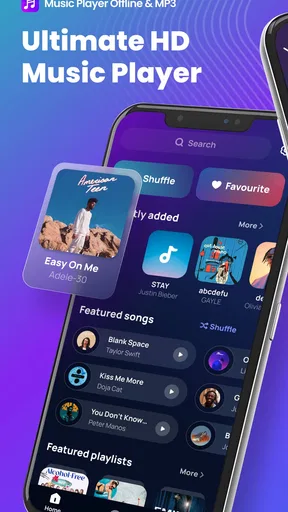
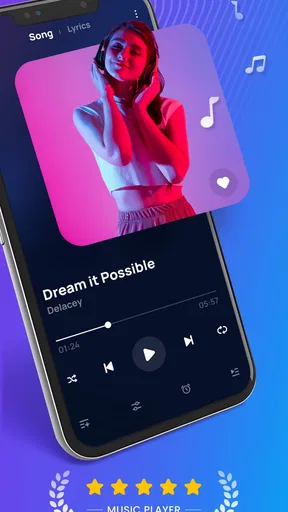
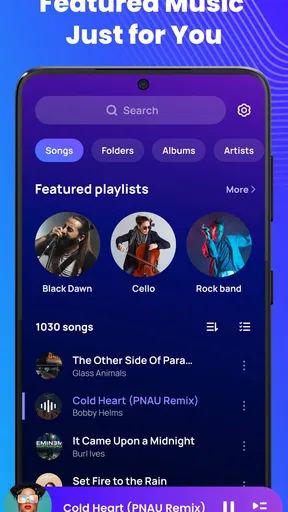
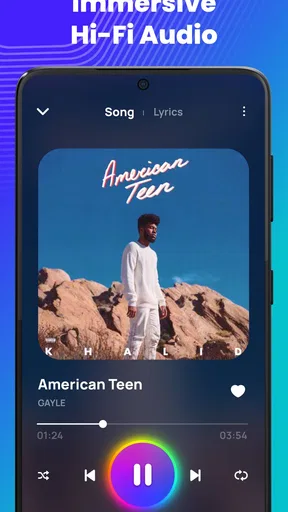
 Analysis by AppCompare
I reach for Music Player Offline & MP3 when I want to listen to music already stored on my device without turning playback into a streaming session. That offline-first focus is the most useful thing about it: the songs you have on hand remain available when a connection is unreliable or you would rather not use mobile data. It is a music and audio app from AceTools Team, and its appeal is practical rather than complicated.
Why offline playback changes the routine
With a streaming service, listening often depends on a connection, a catalog, and the way that service organizes music. This player is aimed at a different job: playing local audio files. Once your tracks are on the phone, you can listen without relying on a signal or waiting for a stream to load. That distinction matters on a commute through patchy coverage, during a flight, or in a place where you prefer to keep data use down.
It is also a useful way to keep a personal collection in one place. If you have music files gathered over time, an offline player can make that library easier to revisit than switching between folders and individual files. The trade-off is that you need to bring the music with you: this is not a substitute for a service that supplies a large online catalog or discovers new artists for you.
How I would use it day to day
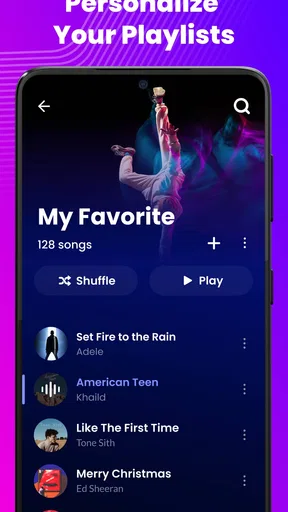
A sensible routine is to prepare a few playlists before leaving home, then choose one that suits the situation rather than searching for tracks while you are out. A short mix for a walk, a longer queue for a trip, or a set of calmer songs for focused work can each serve a different purpose. The app’s playlist tools make that kind of organization part of the listening experience, not an extra step every time you press play.
The equalizer is useful when the same headphones sound different across genres. I would make a small adjustment for a particular listening setup, then keep the change restrained; boosting every control can make some recordings sound less balanced rather than better. The point is to shape playback to your preference, not to assume that a preset or a stronger bass setting automatically improves every track.
Getting Started with Music Player Offline & MP3
First things first, downloading the Music Player Offline & MP3 app is a breeze. Available for both Android and iOS, it takes just a couple of taps to get it running on your device. Once you fire it up, you're greeted with a sleek, user-friendly interface that's super intuitive. No need to be a tech wizard to navigate this app!
Now, here’s the kicker: this app lets you enjoy your favorite tracks without needing an internet connection. Yep, you heard that right! You can finally say goodbye to those annoying buffering issues and data charges. Just load your music library, and you’re good to go anywhere, anytime.
Worth Reading Before You Choose

Flipboard Shows What News Apps Must Do Beyond the Feed

Switching to Android Auto Means Rethinking Your Driving Routine

Google Calendar Makes a Crowded Week Easier to Manage

Ludo King Makes the Most of the Minutes Between Plans

Baby Panda World Brings Quick Play to Modern Phones, but Its Game Library Feels Busy

ESPN’s Live Game View Makes Following Close Games Easier
Features that Hit the Right Note
Let’s dive into the features, shall we? The app supports a wide range of audio formats, which means you can play just about any file you have. MP3, WAV, FLAC – you name it, this player can handle it. The sound quality is top-notch, making every listening session a delight for your ears.
One of my favorite features is the customizable equalizer. You can tweak the bass, treble, and everything in between to suit your personal taste. Whether you’re a bass head or someone who prefers crisp vocals, this app has got you covered.
Oh, and did I mention the app’s ability to create playlists on the fly? You can organize your music just the way you like it. Feeling nostalgic? Create a playlist of your all-time favorites. Need some motivation? Put together a workout mix. The possibilities are endless!
User Experience and Design
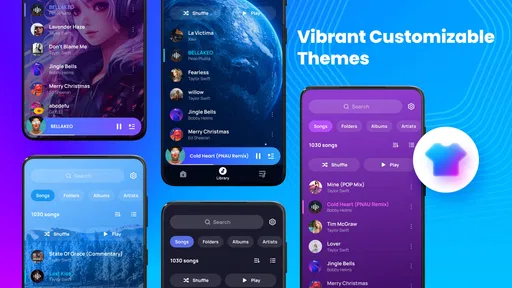
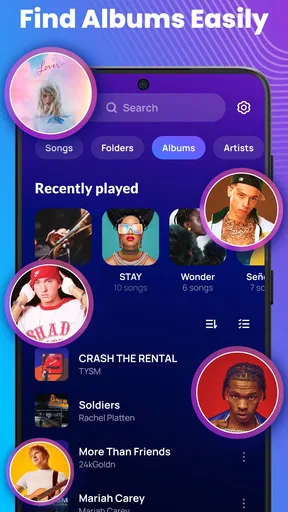
The design is clean and modern, with a minimalistic vibe that’s easy on the eyes. Navigating through your library is a smooth experience, thanks to the app’s well-thought-out layout. You can sort your tracks by artists, albums, or genres, making it super easy to find what you’re in the mood for.
One thing I really appreciate is the app’s stability. It runs like a charm without any hiccups, even on older devices. Plus, it’s light on resources, so it doesn’t drain your battery like some other apps do.
Where it fits—and where it doesn’t
For a realistic everyday example, imagine leaving for a long bus ride with a downloaded playlist and no dependable signal along the route. A local player can keep the music going without the pauses that come with a weak connection. I would build that playlist while connected at home, check that the intended tracks are actually available on the phone, and then start listening offline. That last check is worthwhile: an offline player can only play music that is present in your collection.
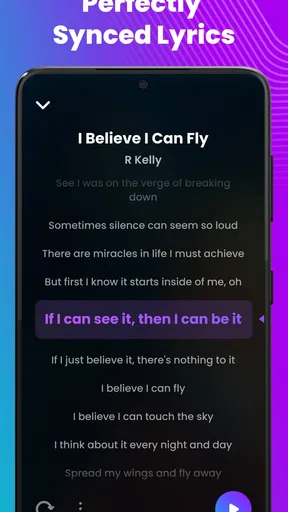
This is also a good fit for someone who has recordings, purchased downloads, or other personal audio files they want to arrange and replay. Lyrics support can make a familiar song more engaging when you want to follow along, while playlists help separate music by mood or activity. For workouts, I would favor a queue that is long enough to avoid constant phone handling; for focused work, a calmer playlist can reduce the temptation to keep choosing the next song.
Compared with the usual streaming alternatives, the main difference is control over a local library rather than access to an online catalog. Streaming apps are usually the better choice if you want recommendations, broad discovery, or music you have not already obtained. A local player is more appealing when you know what you want to hear and value playback that does not depend on a network. I see them as serving different needs, not as interchangeable versions of the same service.
There is a practical setup cost: you need to get your music onto the device and keep that collection organized. If your listening is mostly built around streaming playlists, switching to local playback may feel like extra housekeeping. Likewise, if you expect a player to find and provide songs for you, this app is not the right match. Its usefulness depends on having audio files ready to play.
Small choices that make listening easier
I would start with a manageable library rather than importing everything at once. Grouping tracks into a few purposeful playlists makes it easier to pick music quickly, and naming them by activity can be more helpful than creating several lists with similar titles. Before a trip, I would also open the playlist once and confirm that it contains the tracks I expect; a little preparation is more reliable than sorting things out when the connection has already disappeared.
The equalizer is best treated as a listening adjustment, not a repair tool. If a recording sounds muddy, try a modest change and compare it with the original setting at a similar volume. That makes it easier to tell whether the adjustment helps or merely makes the sound louder. Lyrics are another feature that can change how you use the app: they are handy for singing along or checking a line, but they are not essential to a simple music queue.
One question people often have is whether offline means the app supplies music. In practice, the key distinction is that playback is for music already available in your library, rather than a built-in streaming catalog. Another is whether it suits someone who only listens online; if that describes you, a streaming app is likely more convenient because it combines listening with discovery. If you already keep files on your phone, the local-player approach makes more sense.
The app is free and is intended for Everyone. It has a 4.6 average from around 201 thousand ratings, with over 10 million installs, which suggests that many listeners have tried this straightforward local-music approach. The current version is 2.3.0, and it runs on Android 6.0 or later. Those details make it accessible to a broad range of Android users, though whether it suits you still comes down to how you listen.
Why Music Player Offline & MP3 Stands Out
In a market flooded with music apps, Music Player Offline & MP3 manages to stand out thanks to its offline capabilities and stellar performance. It’s a must-have for anyone who values convenience and quality. The app doesn’t bombard you with ads, which is a huge plus in my book. You get to enjoy your music uninterrupted – just the way it should be.
The developers have clearly put a lot of thought into user feedback, and it shows. Regular updates keep the app fresh, with new features and improvements rolling out frequently. It’s nice to know that the app is constantly evolving to meet user needs.
Who gets the most from it
I would recommend it most to listeners who already own or keep audio files and want a simple way to play them, shape the sound, and sort tracks into playlists. It is particularly handy when a network connection is inconvenient, but it can also make everyday listening more predictable: your choices are the files you have, rather than a stream that may change with connectivity or catalog availability.
On the other hand, I would point a discovery-focused listener toward a streaming service, and someone who rarely keeps audio files locally may not get much value from installing a dedicated player. The honest dividing line is preparation. If you are willing to maintain a personal collection, the offline focus is a strength; if you want music on demand without managing files, it can feel like unnecessary work.
Final Thoughts
So, is Music Player Offline & MP3 worth the download? Absolutely! Whether you’re a music aficionado or just someone who enjoys a good tune now and then, this app is a fantastic addition to your device. Its offline functionality, excellent sound quality, and user-friendly design make it a standout choice.
Ready to take your music experience to the next level? Give Music Player Offline & MP3 a spin and let your ears be the judge. You won’t be disappointed!
Pros
- No internet needed for playback
- User-friendly interface
- Supports multiple audio formats
- Customizable playlists
- Equalizer with sound presets
Cons
- Ads can be intrusive
- Limited free features
- No cloud sync option
- Interface lacks modern design
- No lyrics integration
FAQs for Music Player Offline & MP3
What features does Music Player Offline & MP3 offer?
Music Player Offline & MP3 offers a variety of features including high-quality audio playback, customizable playlists, and an intuitive user interface. It supports multiple audio formats like MP3, WAV, and FLAC. The app also includes an equalizer with preset options, allowing users to tailor their listening experience. Additionally, it provides offline playback, so you can enjoy your music without an internet connection.
Is Music Player Offline & MP3 free to download and use?
Yes, Music Player Offline & MP3 is available as a free download on both Android and iOS platforms. However, it may offer in-app purchases or ads to support the developers. These might include premium features or an ad-free experience. Be sure to check the app store description for detailed information about any costs involved.
Does the app support offline music playback?
Absolutely. Music Player Offline & MP3 is designed specifically for offline playback, which means you can play your saved music files without needing an internet connection. This makes it ideal for situations where connectivity is limited, ensuring you have access to your favorite tracks anytime, anywhere.
What audio formats are compatible with Music Player Offline & MP3?
Music Player Offline & MP3 supports a wide range of audio formats, ensuring compatibility with most music files. Common formats include MP3, WAV, AAC, and FLAC. This flexibility allows users to play almost any music file without needing additional conversion tools, making it a versatile choice for music enthusiasts.
Is Music Player Offline & MP3 user-friendly for beginners?
Yes, the app is designed with a user-friendly interface that is straightforward and easy to navigate. Beginners will find the setup process simple, with intuitive controls for creating playlists, browsing music, and adjusting playback settings. The app aims to provide a seamless experience for both new users and seasoned music listeners.


